What an agent block looks like
A block with an agent has a different shape from one spent typing. You specify, wait, read a diff, and correct. Output arrives in seconds, which makes the end of the block easy to lose: there is always one more prompt, and “almost right” looks like “nearly done”.
That is the case for a goal and a finish line written before you start. “Land the search endpoint” is a direction. “The endpoint passes the existing tests and I have read every changed line” is a test you can answer yes, partly, or no when the timer ends. NEDIO does not check the answer. It keeps it, next to the goal and the length of the block.
How a block works in Cursor
- Open the NEDIO icon in the activity bar, then choose Sign in to NEDIO and confirm the connection in your browser. You do this once.
- Pick a work mode and a sprint length. The default is 25 minutes; the options are 15, 25, 45, 60, 90.
- Type one goal and, optionally, what would settle it.
- Start the sprint. The countdown shows in the status bar and the audio plays from the editor.
- When it ends, mark the goal completed, partly, or missed, say what you got done, and park the next step.
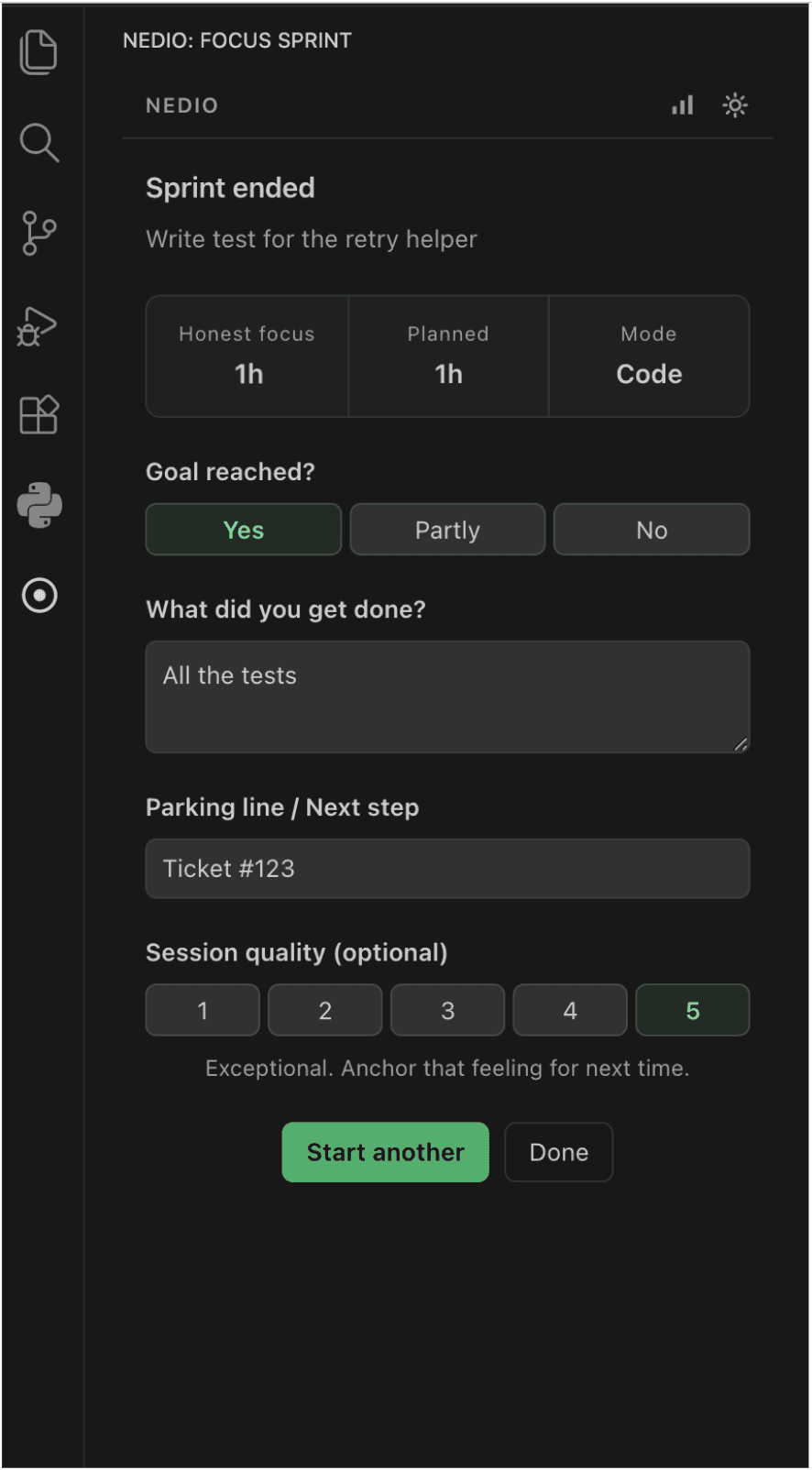
If you answer partly or missed, the goal is offered back on the next setup screen, so the next block starts from where this one stopped instead of from memory.
Which work mode
The modes are Code, Debug, Plan, Review, and AI Agent. The mode is a label you choose before the block, and the weekly statistics group by it. In an agentic editor the work often is the specification or the reading, so filing every block as Code makes your history harder to read later.
AI Agent
You are steering the agent: prompt, wait, read, correct.
- Example goal
- Land the search endpoint the agent drafted
- Done when
- The endpoint passes the existing tests and I have read every changed line
Plan
You are writing the specification before any code is generated.
- Example goal
- Outline the next endpoint and data flow
- Done when
- The spec names inputs, outputs, and the one edge case I am unsure about
Review
You are reading a finished diff from the agent or a teammate.
- Example goal
- Review the PR and note the risky edge cases
- Done when
- Each changed function has a note: checked, unchecked, or question
Debug
You are chasing a failure, with or without the agent.
- Example goal
- Trace the login issue and isolate the cause
- Done when
- One failing test reproduces it, and I have written down the suspected line
The goals and finish lines above are examples, not recorded sessions.
What NEDIO records, and what it does not
Counted by NEDIO
When the sprint started and ended, focused time with pauses excluded, and minutes of audio played.
What you declare
The work mode, the planned length, the goal, and the “done when” line.
What you report
Whether the goal was reached, what you got done, the next step, and an optional quality rating.
NEDIO does not read your source code, file names, or repository names, in the browser or in the VS Code and Cursor extensions. NEDIO cannot see whether you typed a line or accepted one, and it does not control coding agents or know when one is running. NEDIO does not check whether your goal was reached or whether your code works. It records what you tell it.
That is deliberate. A tool that graded your acceptance rate would be measuring the agent, and whether the goal landed is your judgment, recorded as yours.
What you can learn, and when
Right away, with a free account: weekly focus statistics, which are minutes, blocks, goal outcomes, and how your work splits across modes and lengths. You can see, for instance, how often each work mode landed its goal.
Over weeks, with Pro: AI Review looks for patterns in your own sprints. A comparison is shown only with at least 14 qualifying sprints on 8 separate days, at least 14 days since your first close-out, and a difference that is both large enough and statistically significant (p at most 0.05, with a correction for the number of comparisons tried). Most weeks nothing clears that, and the review says so. A sprint counts toward AI Review when it has a completed close-out and at least 10 minutes of focus time. Only the first 3 sprints of a calendar day count, and the review looks at the last 28 days.
It does not tell you whether Cursor made you faster. It can show how your own blocks went, and says so plainly when nothing separable turns up. How AI Review decides what counts as a finding.
What the evidence says, and what it does not
Developers report that AI output often needs more work than it first seems. In Stack Overflow's 2025 survey, 66% of the 31,476 respondents who answered said they run into AI solutions that are “almost right, but not quite”, and 45.2% said debugging AI-generated code is more time-consuming. Of the 33,244 who answered the trust question, 46% said they distrust the accuracy of AI tools and 33% said they trust it. These are self-reported frustrations, not measurements.
One 2025 trial by METR, with 16 experienced open-source developers on 246 tasks, found that developers' own estimates of AI's effect on their speed did not match what was measured. METR has since said that its effect estimate is outdated and that its follow-up results are unreliable, so that trial tells you something about how hard it is to judge your own sessions, and nothing about how today's tools perform.
We found no study showing that a timer or a written goal improves AI-assisted work. This page makes no claim that Cursor makes you faster or slower, or that NEDIO changes either.
Free and Pro in Cursor
The extension needs a free NEDIO account. It gives you 60 minutes of focus audio a day, plus session history and weekly focus statistics. Pro removes the daily limit and adds AI Review. The daily limit counts focus audio, and a sprint starts with audio. When the allowance is used up, the sound and the running sprint stop, and the next block cannot start until the allowance resets or you have Pro. A block already under way may finish, for up to 90 minutes. Goals, close-outs, history, and statistics you have already recorded are not affected.
Install
Search NEDIO in the Extensions panel, or open the Open VSX listing directly. That is the registry Cursor reads, and the build there is the same one the VS Code Marketplace serves. Then open the NEDIO icon in the activity bar and connect the editor once.
The panel, status bar, commands, and settings are identical to the VS Code build and are documented on the VS Code page.
Frequently asked questions
Is this a different extension from the VS Code one?
No. It is the same extension, published to a different registry. Microsoft’s Marketplace terms cover VS Code itself, so Cursor reads Open VSX instead, and every release is published to both. The software is identical. This page covers what is specific to working with an agent.
Do I need an account?
Yes. The extension needs a free NEDIO account, which you connect once from the panel. The free plan has a daily audio allowance, and Pro removes it. See the pricing page for current prices.
Does NEDIO see what the agent generated?
No. NEDIO reads no workspace content: not your source, not diffs, not file names, not repository names. It records what you typed into it and what it counts. Whether a person or an agent typed the code is invisible to it.
Does it start, stop, or steer the agent?
No. NEDIO does not control coding agents and does not know when one is running. It is a timer, a goal, and a close-out that you fill in. The block ends when the timer ends, whatever the agent is doing.
Will this tell me whether Cursor makes me faster?
No, and a timer cannot. That would need a comparison with a version of your week that did not happen. NEDIO gives you your own record: what you meant to do, whether it landed, and how long the block ran. Over enough sessions that can show patterns in your own work, and many weeks show none.
Which work mode should I use for agent-heavy sessions?
Use AI Agent when you are steering an agent: prompting, waiting, and reading what comes back. Use Plan when you are only writing the specification, and Review when you are reading a finished diff. Modes are labels you choose, and they are what the weekly statistics group by, so one honest tag keeps your own history readable.
Does the music interfere with the Cursor chat panel?
No. Audio runs inside the extension and does not touch the editor’s chat. The sprint panel has its own activity bar container, so it does not take the sidebar slot you keep chat in.
Does it work in Windsurf, Trae, or other VS Code forks?
It is built and tested against VS Code and Cursor. Other forks that implement the VS Code extension API at version 1.85 or later will generally run it, but we do not verify them before a release.
Is NEDIO free, and where is the limit?
Yes. The browser app gives you 30 minutes of focus audio a day without an account, or 60 minutes a day with a free account. Pro has no daily limit. The daily limit counts focus audio, and a sprint starts with audio. When the allowance is used up, the sound and the running sprint stop, and the next block cannot start until the allowance resets or you have Pro. A block already under way may finish, for up to 90 minutes. Goals, close-outs, history, and statistics you have already recorded are not affected.