
The short answer
You do not have to finish the task to finish the session. Before stopping, record what changed, what you checked, what remains uncertain, and the first action to take next time.
The fear behind “one more change” is often reasonable: you have finally loaded the architecture, traced the failure, and remembered why an earlier solution was rejected. Walking away without a handoff means paying that loading cost again. But continuing while tired does not preserve context reliably either. It can add a second problem: unreviewed changes that tomorrow-you must also understand.
Treat the last few minutes as a handoff between two developers who happen to be the same person. The first developer knows the live state. The second will arrive without it. A useful handoff makes the next decision visible; it does not try to archive every thought.
A task can stay open while the session closes
“Done” is overloaded in development. A ticket may require implementation, tests, review, deployment, and observation in production. A single work block may only be capable of reproducing the bug or checking one permission path. If the only acceptable stopping point is the completed ticket, many sessions have no honest ending.
Give the session its own contract. “Reproduce the guest invite failure and write down the observed response” is a complete session even though the bug remains. “Review the database rollback path and list what is unchecked” can finish before the pull request is approved. The session succeeds when it produces the named evidence, decision, or handoff—not when the whole project disappears from the backlog.
This distinction also prevents false completion. Checking “done” because the timer rang says nothing about the code. Conversely, marking a session “partly” does not erase a useful result. The useful record is the combination: intended outcome, observed outcome, and the next decision.
Choose a stopping point before fatigue chooses it
A timer is a checkpoint, not an order to throw away a useful train of thought. When it ends, ask whether the current operation is safe to finish. Saving a file, completing a test run, or writing the result of a command usually takes less time than reconstructing an ambiguous half-action tomorrow. Starting another hypothesis, refactor, or agent request is different: it opens a new loop.
Use a simple rule: close the smallest operation already in flight, then do not open another one. If a test is running, capture its result. If a change is not safe to keep, revert or stash it deliberately. If an agent is working, decide where its output will be reviewed; do not call “agent still running” a personal restart note. The agent's technical context and your own memory are separate systems.
Some developers prefer long blocks and ignore short Pomodoro alarms once they enter flow. Others use short blocks primarily to begin a daunting task. Both patterns appear in developer discussions. The practical response is not to declare one interval correct. Pick a checkpoint long enough for the work, then judge the checkpoint by whether it creates a useful decision.
Write a restart note that names an action
Keep the note short enough that you will actually write it. Five lines cover most personal handoffs:
Changed:
Checked:
Still unknown:
Next action:
Open first:
“Changed” names the code or decision you altered. “Checked” separates observed evidence from confidence. “Still unknown” prevents an assumption from hardening into fact overnight. “Next action” must start with a verb and be small enough to begin without replanning. “Open first” points to the test, file, diff, log, or issue that carries the durable detail.
Avoid notes such as “continue auth”, “finish review”, or “ask Claude again”. They describe a topic, not an action. Prefer “Run the guest-invite test alone and inspect the 403 response”, “Compare the migration with the rollback SQL”, or “Read the unchecked error branch in parseToken()”. A future action should be observable: you will know when you have performed it.
Do not paste secrets, private code, or a large debugging transcript into a URL or analytics field. Keep sensitive detail in the repository, issue tracker, or approved notes system. The session record can point to that source with a safe label.
Worked example: stop during an auth bug
- Session goal
- Reproduce the guest invite failure and locate the failing permission branch.
- Done when
- The response and responsible branch are recorded.
- Changed
- Added a failing fixture for an expired guest invite. No production logic changed.
- Checked
- The handler returns 403 before the refresh-token branch. Admin and owner fixtures still pass.
- Still unknown
- Whether expired guest invites should refresh or fail with a more specific response.
- Next action
- Read the invite policy, then decide the expected response before changing the handler.
- Open first
- The failing test and the policy section linked in the issue.
This is a useful ending because it does not pretend the bug is fixed. It preserves the verified boundary and protects tomorrow's developer from making a code change before resolving the product decision. The note is not a replacement for the policy or test; it tells you which durable artifacts matter next.
Notice what is absent: a full diary, a theory about personal productivity, and a promise that the same ritual works for everyone. The handoff contains enough information to choose the next action. More text would make it slower to write and slower to scan.
Resume from the decision, not from the entire diff
The next day, read the handoff before opening every tab. Confirm that the repository and issue have not changed, then turn the saved next action into the new session goal. In the example above, the first job is to resolve the expected behavior from the policy—not to stare at the handler and rediscover yesterday's path.
If the environment did change, update the plan explicitly. A merged branch, new comment, failed deployment, or revised requirement can invalidate the saved action. That does not make the note useless; it gives you a concrete previous state to compare with the new one.
After beginning, resist turning the restart ritual into another planning session. Open the named artifact, perform the first action, and let the new evidence determine what follows. A handoff works when it reduces the distance to the first meaningful operation.
What this looks like in NEDIO
Before the block, write one goal and a “done when” line. During the block, the goal remains visible in the browser title or editor status bar. At close-out, record whether the outcome landed, what happened, and the parked next step. The next setup can offer that parked line as the starting point.
This is a personal record, not an automated inspection of the workspace. NEDIO does not read the code, know which test passed, or verify the outcome. You decide what evidence belongs in the durable engineering system and what short cue belongs in the session record.
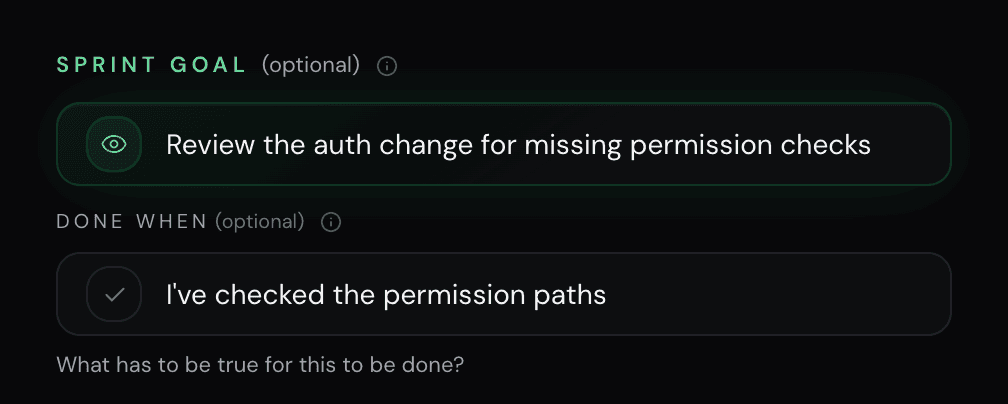
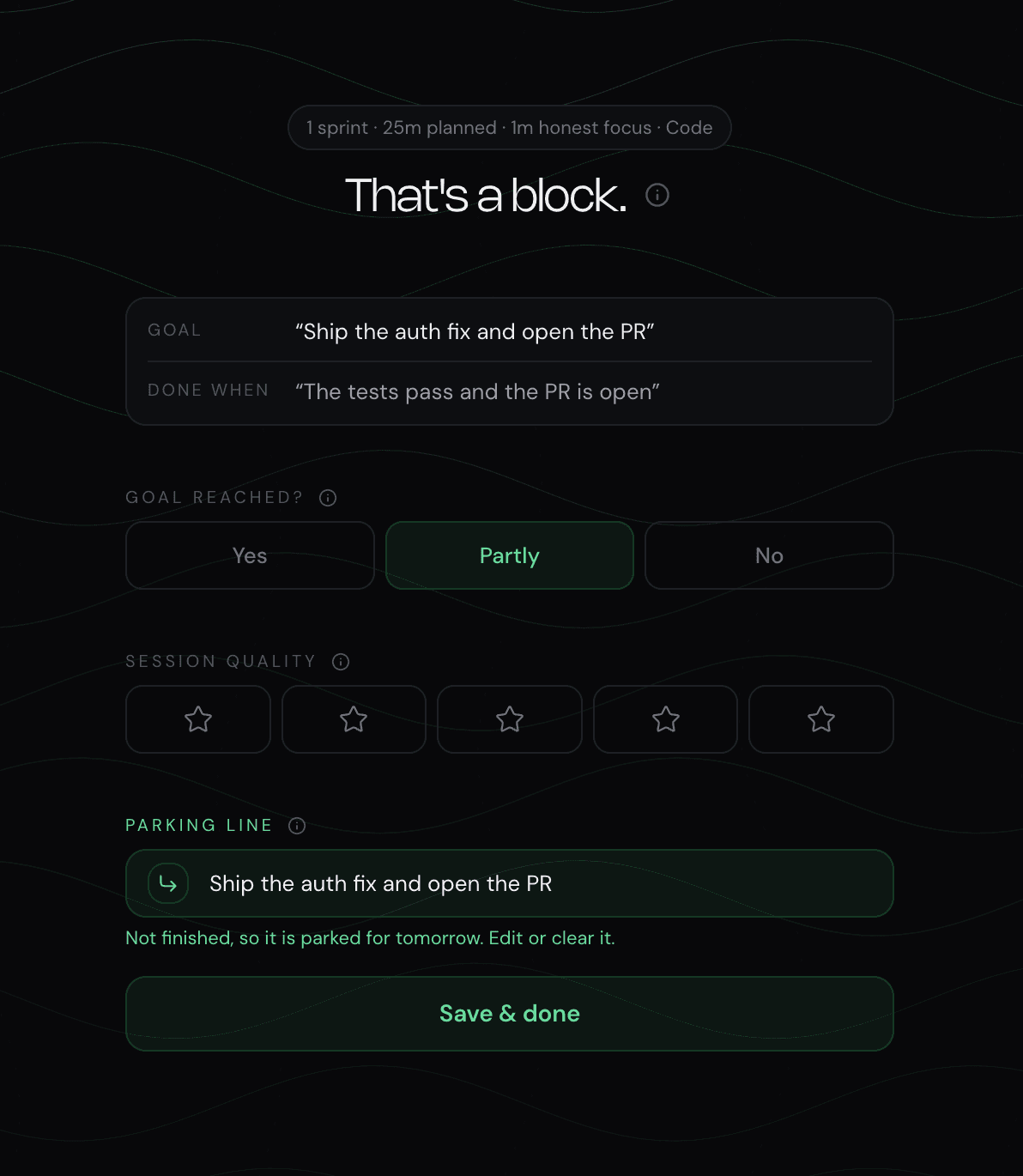
The button on this page opens an editable example. It does not start the timer and it contains no real project information. Replace the example with a safe description of your own next operation.
When a plain note is enough
If a comment beside the failing test reliably brings you back, use it. If the whole team needs the handoff, put it in the issue or pull request. If the task is a two-minute mechanical change with no reconstruction cost, a separate session record may add friction without adding value.
NEDIO is most useful when you want the goal, time boundary, outcome, and next step in one personal history across browser and editor sessions. It is not a reason to duplicate your team's source of truth. The right tool is the lightest one that leaves tomorrow with a trustworthy first move.
Frequently asked questions
Is it okay to stop coding before the task is finished?
Yes. A task and a work session have different boundaries. Finish the session by recording the current result, the remaining uncertainty, and one concrete next action. The task can stay open without becoming mysterious.
What makes a useful next-step note?
It names an observable action and its location. “Inspect the guest branch in authorizeInvite() and add the missing failing test” is restartable; “continue auth” is not.
Does this replace Git, an issue tracker, or documentation?
No. Keep durable code decisions and team-visible work in the repository or issue tracker. A session note is a small personal handoff that points back to those sources.
Does NEDIO restore my editor or the coding agent context?
No. NEDIO preserves the goal, the outcome you record, and the parked next step. It does not restore tabs, a Git branch, terminal state, or an AI assistant context window.